
CRM vs ERP: key differences, benefits, and choosing the right solution

Ineffective with sales reps? Low-quality leads or a lack of them? If you’ve encountered these challenges, you’re not alone. Many companies lose potential clients due to manual data management, which often leads to errors, slow decision-making, and delayed responses to customer inquiries.
This is where CRM/ERP systems come in. They centralize all information, automate routine tasks, and create the conditions for seamless collaboration across departments. ERP solutions integrate the finance department, inventory, and internal processes, improving communication and reducing costs.
With these tools, your business operates smoothly at every stage. Keep reading to discover how implementing CRM/ERP systems can upgrade your business!
What is CRM?
Let’s start with the basics and explore what CRM is and why it matters.
CRM or Customer Relationship Management systems are primarily designed to automate customer interaction, especially in sales. Sometimes, these solutions may also cover service processes or certain marketing functions, such as email campaigns or other outreach efforts. In other words, CRM is used to manage sales processes and follow-up transactions.
CRM is used exclusively for tracking results and is not designed for inventory, human resources, or other assets accounting. While the system can interact with such data through integrations, its core function is customer relationship management. Accounting and enterprise resource planning and management remain the responsibility of specialized systems.
A CRM system may include a payment recording function, as the outcome of a sale is the payment itself. However, CRM does not fully account for financial transactions. This means the call order management system does not track balances or expenses, leaving these functions to specialized accounting systems such as ERP.
It is important to understand that a CRM is a process-oriented system. This means it is designed to support specific processes, particularly sales, unlike ERP software, which is an accounting system.
Key features of CRM:
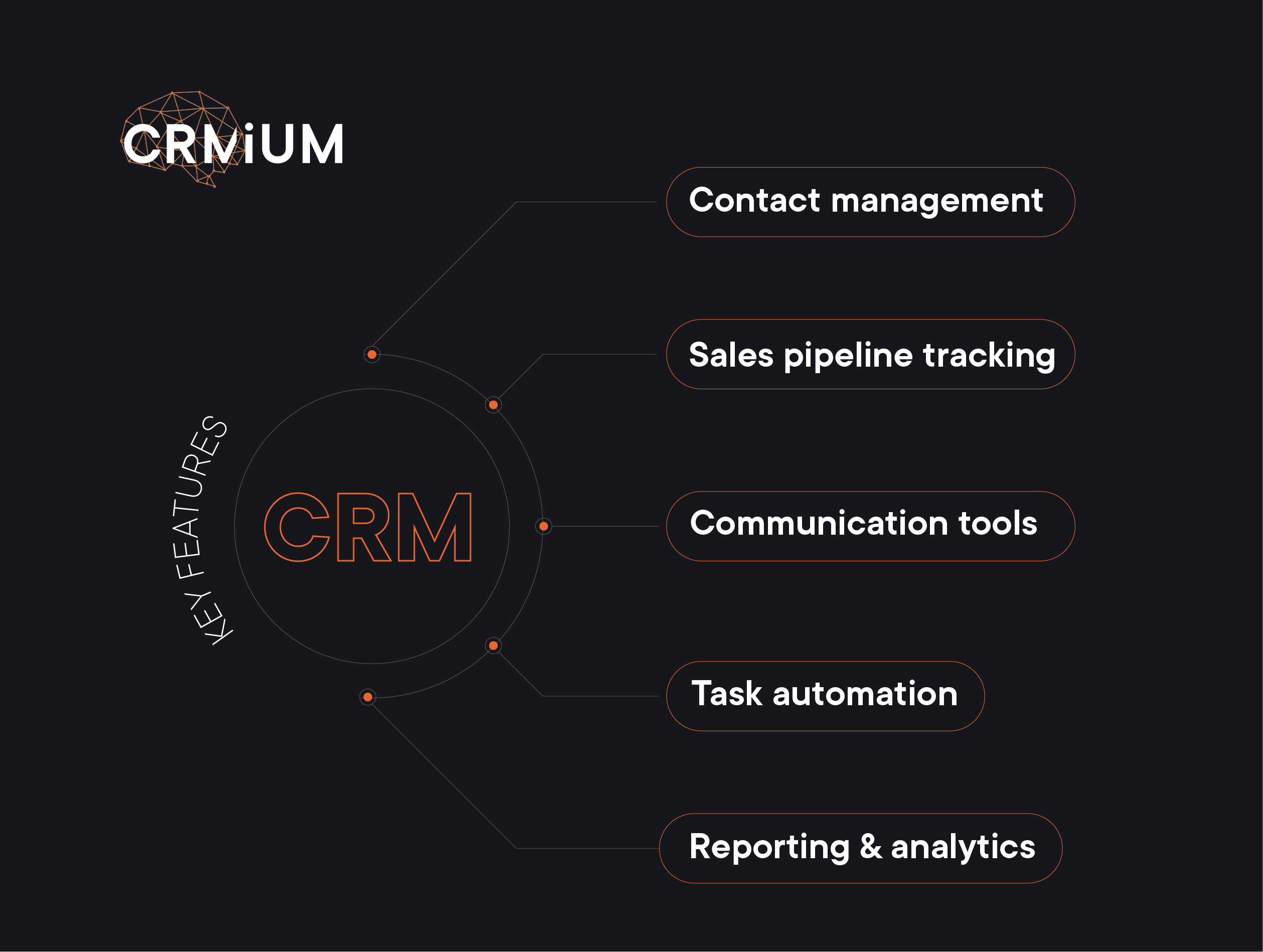
- Contact management
CRM allows you to store all customer information in one place: contacts, communication history, deals, preferences, and even manager notes. This means that every team member can access up-to-date customer data and quickly find the necessary information without the chaos of spreadsheets or handwritten notes. - Sales pipeline tracking
Transparency in sales and project management is the key to success. CRM helps track every lead at all deal stages — from the first contact to contract signing. You always have a clear view of who is currently in your sales funnel, which deals need attention, and what actions can be taken to speed up the sales process. - Communication tools
CRM integrates various communication channels such as email, calls, and messaging apps to ensure that no contact is lost. You can view the interaction history with each customer, send personalized messages, and even set up automated responses for quick follow-ups. Research shows that 80% of customers are more likely to purchase if they receive a customized experience, and 90% appreciate companies that take a personalized approach. - Task automation
No more wasting time on routine tasks! CRM automates follow-up reminders, meeting scheduling, and even report generation. This allows managers to focus on high-priority tasks — engaging with customers and closing deals. - Reporting & analytics
Make data-driven decisions with ease. CRM provides real-time dashboards and analytics, helping you see which channels generate the largest number of leads, how well your sales team is performing, and where bottlenecks exist. This helps refine strategies, optimize workflows, and increase revenue.
Benefits of CRM:
Implementing a Customer Relationship Management system can transform the way businesses manage sales, streamline operations, as well as optimize all business processes related to relationships with customers. Some more benefits of using automation? Here they are:
- Increase in lead generation
Marketing automation significantly enhances the number of potential customers. It makes finding and managing leads easier, improves their quality, and moves them faster through the sales process. - Improved conversion rates & personalized content
Automation enables the creation of personalized messages for each customer based on their preferences and behavior. This significantly improves communication effectiveness, ensuring customers receive content that aligns with their interests, which increases conversion. - Time and resource savings
Automation reduces the time spent on routine tasks such as campaign planning, email distribution, and social media management. This allows marketing teams to focus on more critical business aspects, such as creativity and strategic planning. Automation is a powerful tool for improving sales performance and reducing marketing expenses. It can help businesses increase sales by 14,5% while cutting marketing costs by 12,2%, making operations more efficient and cost-effective. - Enhanced analytics and reporting
Automation offers strong analytics and reporting tools, allowing businesses to track marketing performance in real time. With data-driven insights, companies can quickly adjust their strategies for better results. According to research, 76% of companies have seen a significant boost in customer satisfaction after integrating analytics into their marketing approach. - Increased revenue
Automation helps companies achieve their goals faster and improve sales performance. Businesses can drive higher overall revenue by reducing marketing costs and increasing efficiency.
Who needs CRM?
CRM systems help different teams work smarter and improve customer relationships. Sales teams use them to track deals and monitor performance. Marketing teams create targeted campaigns and organize customer groups more effectively. Customer service teams provide personalized support and build stronger customer loyalty. Among CRM benefits, there is also better campaign tracking, helping marketers measure ROI and refine strategies. By bringing these core business functions together, a CRM makes managing customer relationships easier and more efficient.
What is ERP?
ERP stands for Enterprise Resource Planning software. Interestingly, the term does not explicitly mention accounting, yet historically, most ERP systems have been developed primarily as accounting solutions. ERP software is essential for effectively managing internal business processes and resources such as finances, raw materials, goods (in the case of manufacturing or trade), personnel, equipment, and other assets and ensuring their optimal use.
ERP software also manages core business processes, but it is not limited to accounts. Its primary focus is on managing resource flows, including procurement, storage, shipping, write-offs, time tracking, and other various resource planning-related operations.
ERP software is fundamentally an accounting system, where each resource has a quantifiable value that changes based on the documents processed within the system. This generates data that is reflected in reports. This accounting-driven nature is the key difference between CRM and ERP.
Key features of ERP:
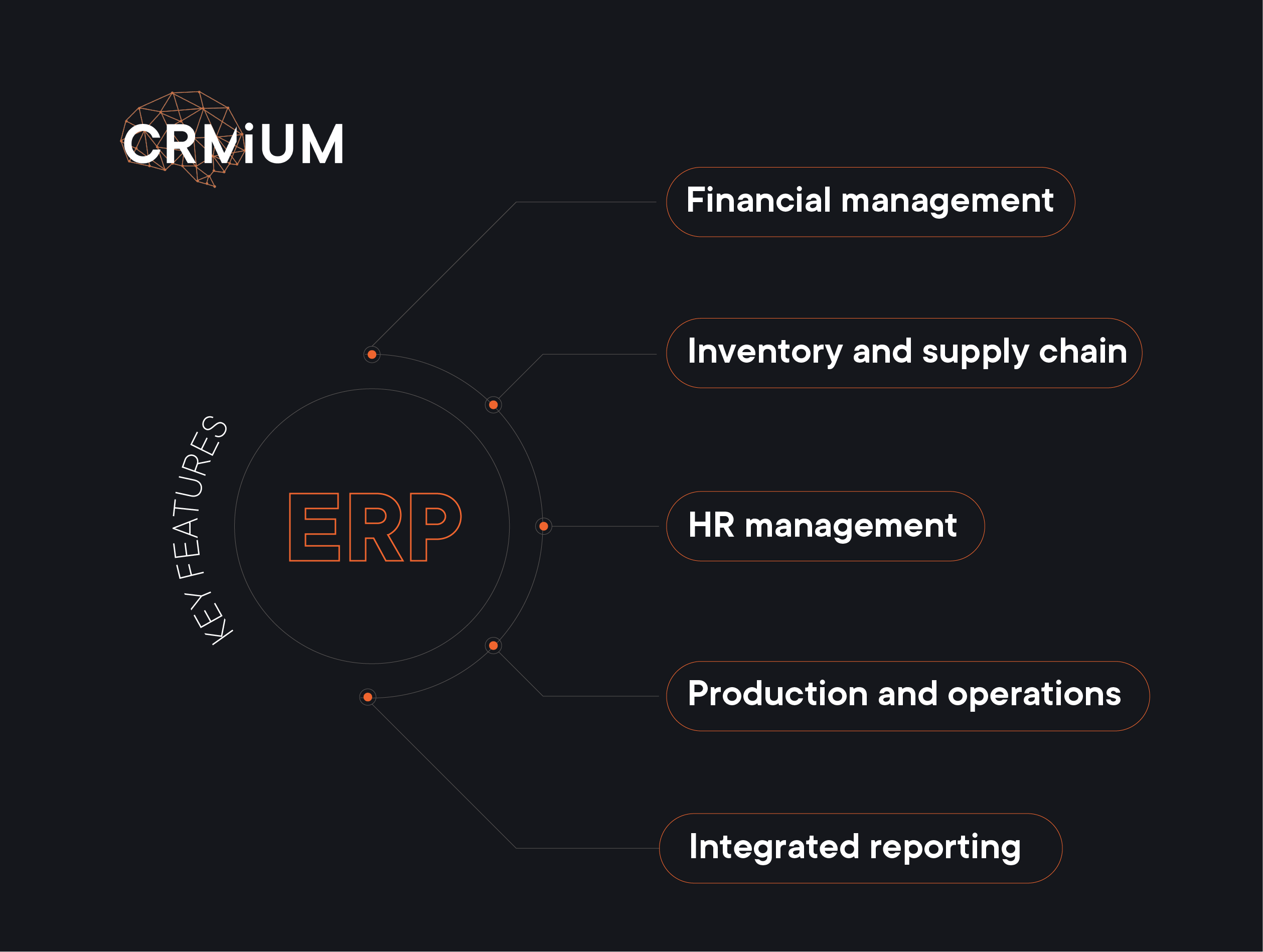
- Financial management
Enterprise Resource Planning systems streamline financial operations by automating processes such as income tracking, expense management, budgeting, and financial reporting. ERP systems reduce manual errors and accelerate financial decision-making. - Inventory and supply chain management
ERP systems give businesses real-time access to inventory levels, order tracking, customer purchase history, and supplier details. This helps companies manage stock more efficiently, cut down on waste, and strengthen relationships with suppliers. Businesses that focus on digital supply chain strategies can see a 3.2% increase in profits and a 2.3% growth in revenue each year. - Human resources management
ERP systems bring together employee records, payroll, and performance data in one place. This centralization improves data accuracy and helps with better workforce planning. - Production and operations
ERP systems track manufacturing, quality control, and logistics. By bringing these functions together, businesses can improve performance and product quality. For example, some companies have seen a 4-10% increase in profits due to better workforce productivity and product availability. Cloud ERP systems may also be a good solution. - Integrated reporting
ERP systems gather data from different departments and create clear reports, helping businesses make better decisions. This integration improves data accuracy and supports smart planning.
Benefits of ERP:
An Enterprise Resource Planning system is like a powerful tool that connects all parts of your business in one place, making everything run smoothly. Plus, the ERP implementation helps save money, stay compliant with regulations, and make data-driven decisions. Let’s discover some more benefits of ERP systems in detail:
- Better productivity
ERP systems automate and simplify many tasks that used to take a lot of time, like tracking inventory or creating reports. This means that all your departments work together smoothly without wasting time on repetitive tasks. Everything is updated automatically, saving you hours of manual work. - Save money
An ERP system helps you use resources wisely by making sure things like inventory are kept at the right levels, avoiding waste or missed opportunities. A study by Aberdeen Group found that companies using ERP systems typically cut their operational costs by 22% and administrative expenses by 20%. - Stay compliant with regulations
An ERP system helps ensure your business stays up-to-date with legal requirements. By keeping track of important records and financial data and automatically adjusting to new regulations, it reduces the risk of errors or fines in industries with strict rules.
Who needs ERP?
ERP systems are necessary for large enterprises with complex operations spanning multiple departments. They are also ideal for manufacturing companies, where coordination between production, inventory, and the supply chain is crucial. Additionally, service-based businesses can greatly benefit from an ERP implementation, by integrating financial and human resources management, streamlining their operations, and improving overall workflow.
The ERP implementation success depends on several key factors: clear objectives and scope, executive support, effective change management, active user involvement, and proper training. Data migration, system customization to meet specific business needs, and seamless integration with other systems are also critical. Additionally, choosing an experienced ERP vendor, setting realistic timelines and budgets, and continuously monitoring and improving the system post-implementation are essential for success.
In CRMiUM we have an interesting case with Ensuria, a company specializing in life and health insurance. They came to us when there was a need for a more efficient tool to manage operational processes, allowing for centralized processing of all company data. They needed a proper ERP solution!
So we chose the Odoo 13 Community Edition ERP platform, with open code, which allows for the integration of various business processes into a single system. The choice of this ERP vendor among other software vendors was driven by the need to implement an efficient solution for automating order processing and customer support. Discover details in the case study about this implementation.
CRM vs ERP: key differences
Most people believe that sales are the foundation of any business, as they drive revenue, attract customers, and fuel company growth. In this context, a CRM system plays a crucial role, enabling businesses to manage customer engagements, track deal progress, and build customer loyalty. But is accounting secondary in this process? The key answer is often obvious: ERP and CRM systems make their best in synergy.
Accounting is the backbone of a legacy system that ensures transparency and control over a business’s key resources – finances, inventory, expenses, and other assets. These are not separate worlds operating independently, but rather parts of a unified system that must work in synergy to achieve sustainable growth.
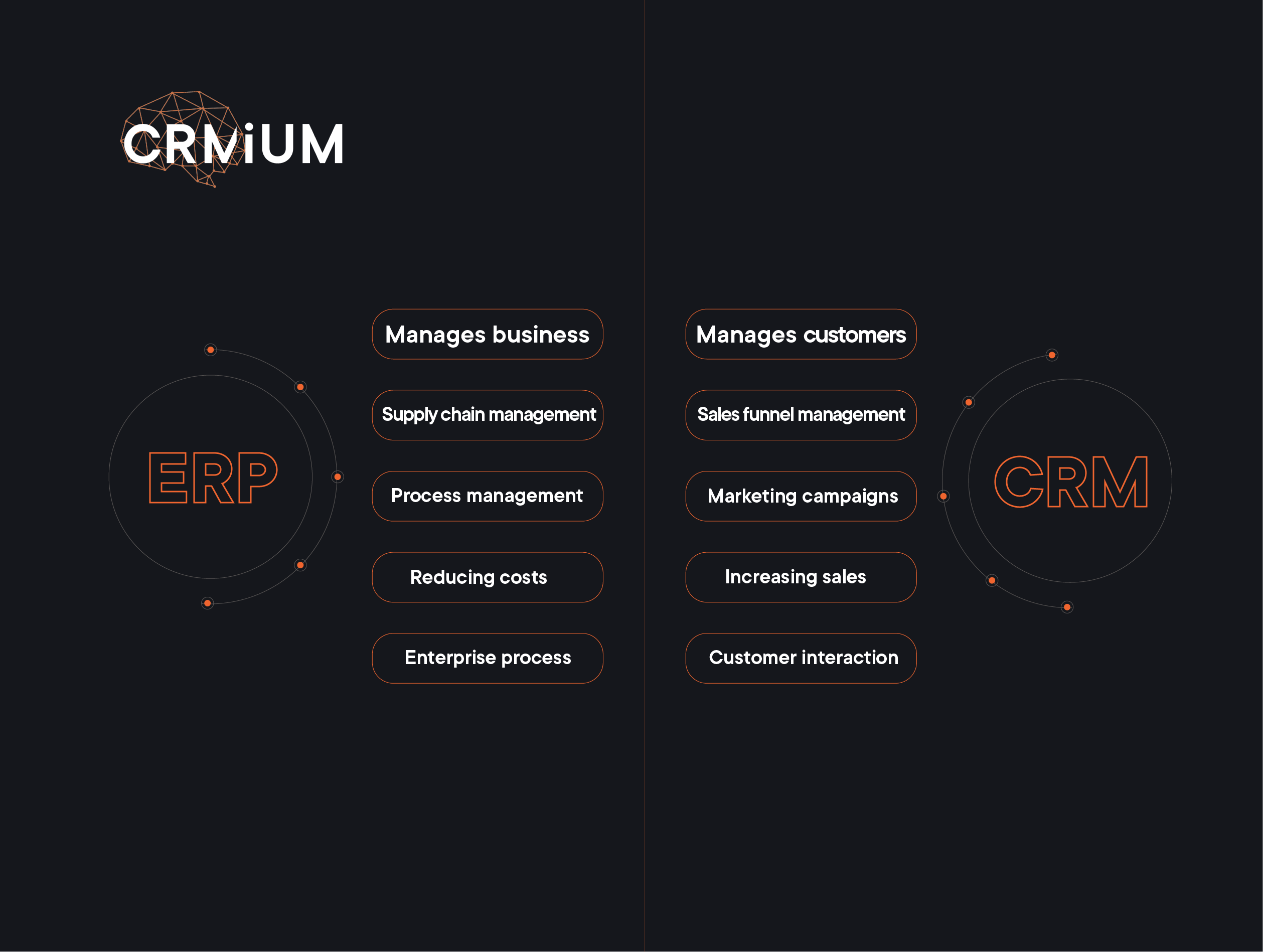
A CRM system focuses on external processes — building customer relationships, while an existing ERP system handles internal processes, structuring resources, and ensuring their optimal use. But what if we use multiple systems?
Which one does your business need?
When deciding between CRM and ERP systems, it’s important to consider your business needs. If your main goal is to improve customer interactions and increase sales, CRM is the way to go. It’s perfect for tracking leads, managing follow-ups, and personalizing customer communications. If your sales team relies on data to forecast trends and boost conversion rates, CRM will support these efforts.
On the other hand, if your focus is on streamlining internal processes and managing resources more efficiently, then ERP software is a better fit. ERP systems are ideal for businesses needing an integrated financial management, inventory control, and supply chain operations solution. If your business spans multiple departments, requiring seamless data integration and reporting, ERP provides the cohesion needed to keep everything running smoothly.
What if you need both?
Many modern businesses find that combining CRM and ERP systems capabilities delivers the best of both worlds and streamlines processes that are crucial for business success, especially when they operate in synergy. Integrated systems can bridge the gap between customer service interaction activities and internal processes, like financial accounting, ensuring a seamless flow of information throughout the organization.
This synergy not only enhances efficiency across business functions across the board but also enables data-driven decision-making that supports sustainable growth, improving the productivity of all departments of the entire organization.
Who can help with CRM and ERP implementation?
The answer to this question is very simple: it should be an experienced CRM and ERP systems vendor or integratior. And we hope that CRMiUM is one of such leaders, as we understand the complexities of choosing and implementing CRM, HRM and ERP systems: we have implemented over 500 projects in more than 25 countries worldwide, including Poland, USA, Israel, Romania, Great Britain, Portugal, etc. So, we’re here to make the process easier for you.
Among the most effective CRM and ERP systems are such solutions as well CRM Zoho, Creatio, Pipedrive, Nethunt, and Odoo ERP, which is an ERP vendor.
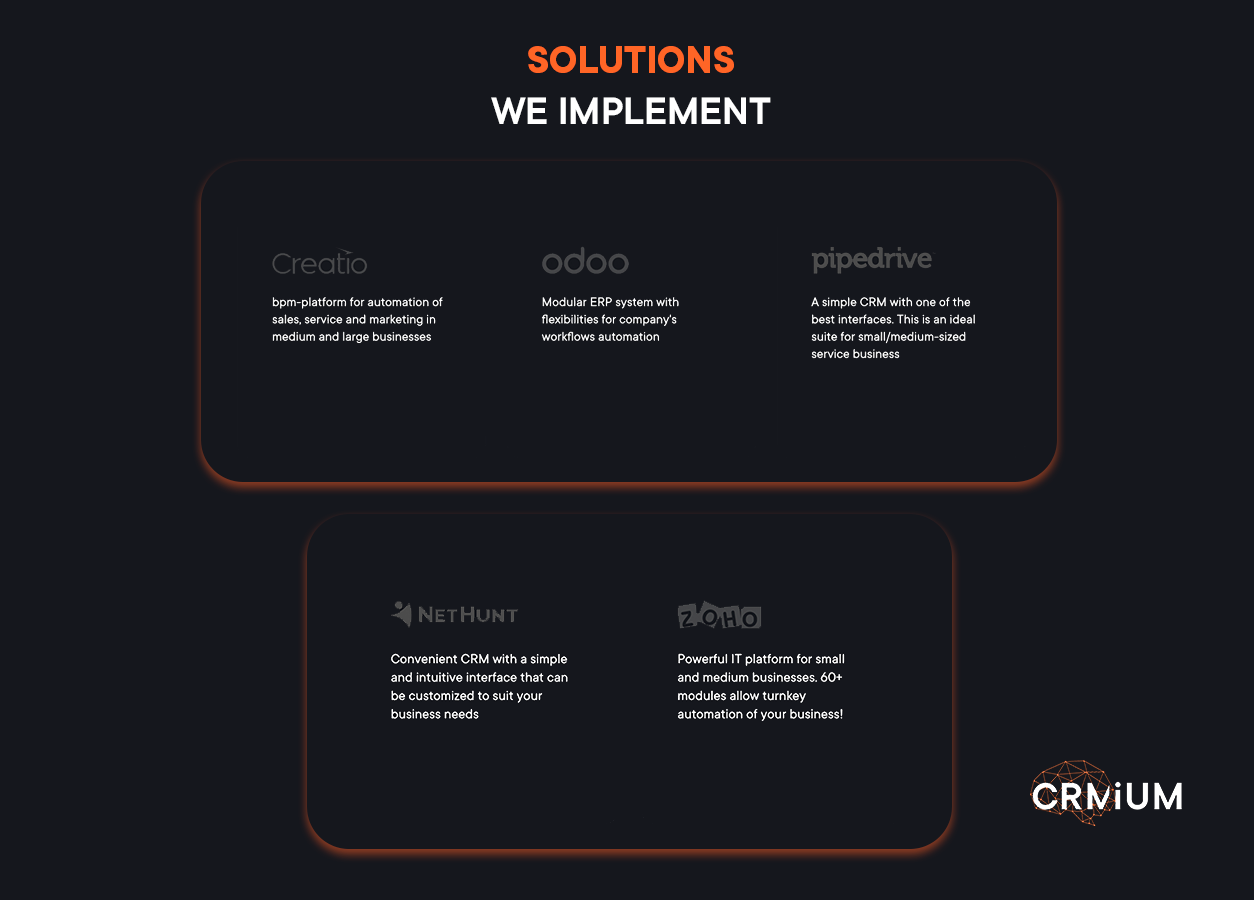
The team of experts specializes in configuring more than 10 CRM, ERP, and HRM systems and offers business consulting services. Our experience deploying multi-system integrations (or assisting in configuring an existing system that may be misconfigured and not used to its full potential) ensures that each solution we provide is perfectly tailored to certain business needs. We are trusted and highly praised for our approach.
But don’t just take our word for it — our clients trust us, which is reflected in the numerous reviews on trusted platforms like Clutch and GoodFirms. However, a real-world case is the best way to get proof of expertise.
One of our prominent projects was the case study of Xenoss, a leading software development company in the USA specializing in MarTech and AdTech. This case demonstrates how CRM systems can be used to optimize business processes and improve operational efficiency. Xenoss collaborates with prominent multibillion-dollar companies such as Nestlé, Adidas, Virgin, Uber, and HSBC, and continuously seeks ways to enhance its operational performance.
Our solution was the implementation of Zoho People with additional configurations that fully adapted the system to meet the company’s needs. We created various forms to track different categories of income and expenses, such as insurance, compensation requests, expenses, overtime reports, and more. This eliminated the need for external documents and systems, centralizing all processes within the CRM. Moreover, we set up a complex automation process for calculating and generating client invoices, which significantly simplifies financial operations. As a result, all critical processes were centralized in a single system, which enhanced productivity, improved data security, and reduced the occurrence of errors.
Another case is about a moving services company “Happy Home Moving”. We provided consulting and CRM software implementation to automate their platform, simplify contract signing processes, and integrate payment methods. Before working with CRMiUM, the company faced challenges in managing its workflow and business processes manually, including lead processing and contract management.
Our solution involved implementing Zoho CRM to automate and streamline the company’s processes. The CRM system efficiently manages leads from various sources, ensuring they are automatically logged into a centralized database. Agents can then process these leads according to a predefined procedure, ensuring no step is missed. The implementation also included automating the contract signing process with clients after work completion, allowing for real-time updates at each stage of the process and accurate calculations of the final cost. Furthermore, the ability to process online payments upon signing the contract and integrate customer inventory control significantly improved operational efficiency.
If you have such problems as described above, maybe it’s time for ERP and CRM systems to enter your life? Automation can boost your business productivity just like in the represented cases.
Get in touch with our expert team today for a tailored consultation and discover how to choose relevant software licenses; how to manage your business data easily; how to simplify your financial data management; how successful ERP implementation can improve productivity via coordinating the supply chain management and workflow of the entire organization; how to manage leads properly etc.
Aren’t you still curious about how automation can evolve your business and how CRM or ERP software implementation can transform all your processes?
In summary
When deciding between CRM and ERP solutions, it’s not about choosing one system over the other: it’s about understanding what your business needs most, depending on the needs and scale of your business, the focus should be on the enterprise resource planning systems or customer relationship management systems. CRM systems are essential for driving sales and enhancing customer interactions, while ERP implementation focuses on optimizing internal processes and resource management.
For many organizations, a combined approach is the best solution. At CRMiUM, our professionals work with you to find the perfect balance between these powerful tools, unlocking their full potential and providing a competitive advantage in today’s fast-paced market. With us, you’re partnering with experts who understand the intricacies of both CRM and cloud ERP systems – ensuring that your business gets the best out of both worlds.
Got Questions? We’ve Got Answers
What is the fundamental difference between CRM and ERP?
The simplest way to look at it is: CRM (Customer Relationship Management) is "front-office" and ERP (Enterprise Resource Planning) is "back-office." CRM focuses on the customer side—sales, marketing, and support—to increase revenue. ERP focuses on the business side—accounting, inventory, and supply chain—to reduce costs and improve internal efficiency.
Can a CRM system replace an ERP, or vice-versa?
Generally, no. While some CRMs have basic billing features and some ERPs have basic contact management, they serve different masters. A CRM is a process-oriented system for managing the sales journey, whereas an ERP is an accounting-driven system where every entry affects the company’s balance sheet and resource quantifiable value.
Why would my sales team need a CRM if we already use an ERP for accounting?
Accounting systems are great at recording what happened, but CRMs are built to help you make things happen. Sales teams need pipelines, follow-up reminders, and communication history to close deals. Relying solely on an ERP often leads to "manual data chaos" where leads are lost because the system wasn't built for active relationship management.
How does an ERP system actually save a company money?
An ERP provides real-time transparency. According to research, companies using ERP systems cut operational costs by an average of 22%. It prevents overstocking in the warehouse, automates payroll, reduces manual errors in financial reporting, and ensures your resources are utilized at 100% capacity.
What are the benefits of integrating CRM and ERP together?
Integration creates a "single source of truth." When your CRM (like Zoho or Pipedrive) talks to your ERP (like Odoo), your sales reps can see real-time inventory levels before promising a delivery, and your finance team can automatically generate invoices the moment a deal is won in the CRM. It eliminates double data entry and speeds up the entire business cycle.
Does a small business really need an ERP?
While nearly every business needs a CRM from day one, an ERP becomes essential once you have complex internal processes. If you manage physical inventory, have multiple departments that need to share financial data, or are struggling with regulatory compliance, an ERP (even a cloud-based one like Odoo) will provide the structure needed to scale without breaking.


