
CRM/ERP and Phone System Integration: Why Your Sales Team Can’t Work Without It
Many companies store customer information in their ERP or CRM systems, while phone calls are managed through a different business communications platform.
These systems are both capable of managing customer data, yet they are separate from each other. The difficulty with managing customer information on separate platforms is that the sales team has to spend extra time looking up customer information and updating calls info and other interactions.
In practice, an ERP system may not provide customer information to a sales team member while a phone call is occurring with that customer. Less information, weaker customer interactions.
In this article, we will use Odoo ERP as an example to explain how ERP and phone system integrations work, the technologies behind them, and the benefits a business can achieve by integrating communications with its core business processes.
Why Odoo ERP and Business Communications Should Work Together
Many businesses use Odoo ERP software to manage their sales, customer records, accounting, and other business operations. Yet the sales team still utilizes phone calls to interact with customers. When these two systems are not integrated with one another, the sales team wastes time looking up information on ERP software when they could be on the phone with the customer.
ERP software holds the data about a company’s customers and its business operations. A phone system can keep a record of all phone calls with those customers. By separating these systems, the business creates inefficiencies within its operations.
For larger businesses with more customers and more interactions between customers and employees, managing this separate ERP software and phone system can be incredibly difficult.
The impact can be major:
| Without Integration | With Integration |
|---|---|
| Manual call logging | Automatic call logging |
| Switching between multiple systems | Unified workspace |
| Limited visibility into customer communications | Complete interaction history |
| Lost or untracked leads | Automatic lead creation from unknown callers |
| Manual contact updates | Contact synchronization |
| Additional administrative work | Streamlined workflows |
For instance, an ERP software can be integrated with a company’s business phone system. This integration allows for the ERP system to automatically provide information to a sales team member while they are on the phone with a customer.
For example, an ERP system may include information on a specific customer, the sales opportunities with that individual, and the products that are in their sales process.
Additionally, the integration of a business ERP software with a cloud communication platform allows for the data about the sales team and customer interactions to be more consistent.
Managers can gain a more accurate view of sales performance and identify the individuals who are most successful at sales.
How Odoo Integration Works
Let’s have a look on a typical workflow:
Customer Call → Phone System → Odoo ERP → Contact Record → Call Activity → Sales Follow-Up
When a customer places a call to the business, the phone system that is in place with the ERP system in Odoo will communicate with that system. Through this integration, the employees within the company can view the customers that are calling and can see details regarding their contact information, sales history, and other aspects of the customer’s interaction with the business.
Below is a look at the key components of a telephone system that is integrated with Odoo.
Contact Synchronization
Accurate contact data is essential for any successful Odoo telephony integration. Contact synchronization helps ensure that customer information is consistent across both systems.
Without it, the contact information for the customers of the company is often kept in multiple places, making it difficult for the employees to ensure that the contact information for the customers within Odoo matches the information that is held within the phone system.
Incoming Call Popup
Caller ID gives employees immediate access to customer information before they answer the call.
When a call is received by the company from a customer, the Odoo ERP system will identify the customer that is placing the call and display the information for that customer upon the employees screens. Employees no longer have to ask the caller for the information that they require regarding the customer, as that information is displayed to them instantly.
The incoming call popup can show the customer’s contact details, past sales, support history, and other relevant records from the ERP system.
Automatic Call Logging
Manual call reporting can quickly become a burden for sales and support teams. Automatic call logging removes this administrative work by recording communication activities directly in Odoo.
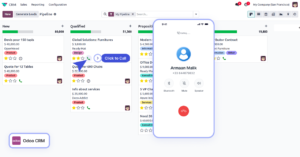
Click-to-Call
For teams that make dozens of calls daily, a click-to-call can reduce repetitive tasks and dialing errors.
Lead Creation from Unknown Numbers
Not every caller is already saved in Odoo. When an unknown number calls your company, the system can help turn that interaction into a new sales opportunity.
An Odoo CRM integration enables the telephone system to communicate with the ERP system of the company to identify the callers that are not already represented within the system, and to automatically create a lead for that individual within the ERP system.
This allows the company to lose none of the potential leads that call their company, regardless of whether or not that individual has already registered as a customer or lead with the company.
Bringing Communication and Business Processes Together
An integrated ERP telephone system brings two of the most important aspects of the company’s operations together. By integrating the cloud communication system with the ERP system of the company, each call to or from a customer can be associated with another process within the business that is relevant to that call.
Results? Better insights into each of the customers of the company, better collaboration with their colleagues and better customer experience with the company overall.
“Companies often focus on optimizing sales pipelines, customer service processes, and operational workflows, but communication data remains isolated in separate systems. This creates gaps in visibility and increases the amount of manual work required from employees.
A properly implemented telephony integration helps bridge this gap by connecting customer conversations with business records. Instead of treating phone calls as standalone events, businesses can incorporate communication activities directly into their sales, support, and operational processes.”
Oleh Romanuk
CEO & Co-Founder, Teliqon
Business Use Cases for Odoo Phone System Integration
The benefits of Odoo phone system integration become most visible when viewed through real business processes. Below are several examples of how a communication system can support different business functions.
Sales Teams
For sales departments, speed and context are critical.
If communication systems are not connected to Odoo, sales representatives have to look up customer information, update records by hand, and write down details of each call themselves.
When a customer calls, the sales representative can quickly see all the important details and keep the conversation on track. After the call, the system links the activity to the customer record, so it is easier to follow up and plan next steps.
Customer Support
Customer support professionals must be well-informed about the products and services that their company offers.
Customers contacting support expect that the support team will have knowledge of the customer’s previous interactions with the company so that the support agent can provide assistance without requiring the customer to share the same information multiple times.
The benefits of integrating communication into customer support include:
- Customer support issues are resolved faster
- The amount of time that customer support representatives have to spend on each customer inquiry decreases
- Customer satisfaction increases
Logistics and Delivery Operations
Communication with customers is an important part of the logistics and delivery industry.
Customers frequently contact logistics companies regarding the status of their shipments or delivery times. With Odoo telephony integration, logistics companies can quickly access customers and order information at the beginning of each call.
Financial Services
Financial services businesses that combine their telephony systems with Odoo can quickly access information on the customer’s past interactions.
Benefits of financial services companies integrating their telephony systems with Odoo include:
- A better understanding of their customers and their past relationships
- Faster access to customer financial information
- Increased efficiency in customer service departments
- More controlled operational system within financial service providers
Step-by-Step Odoo Phone Integration Process
While the exact implementation process may vary depending on the phone system and deployment environment, most Odoo telephony integration projects follow a similar set of steps.
Connecting Your Phone System
Connecting the telephony system within the business to the Odoo telephony integration platform is the first step in creating the automated communication system.
Configuring API Access
After the telephony system is successfully connected to the Odoo telephony integration platform, the next step is to configure the API connection between the two systems. This step allows the phone system to communicate with Odoo, making it possible for the two systems to share information.
Mapping Users and Extensions
After the telephony system is connected to the integration platform, and the API is configured to enable communication between the two systems, the next step is to map the users within the phone system to the users within the Odoo services platform.
Enabling Contact Sync
After connecting the users and phone extensions to the integration platform, the next step is to enable contact synchronization between the two systems. This step automatically syncs the contact information between the phone system and the ERP system.
Configuring Call Logging
In the next step in the process of connecting telephony systems to ERP systems, the organization will enable call logging. By enabling call logging within the system, the telephony system automatically syncs call activities to customer accounts within the ERP system.
Testing Inbound and Outbound Calls
By performing end-to-end tests of the phone and ERP system integration, businesses can verify that the system is working as intended.
Best Practices for Odoo Phone Integration Setup
Although every organization has unique requirements, several best practices apply to most deployments:
- Clean and standardize contact data before integration.
- Define user roles and extension assignments in advance.
- Test synchronization using a small group of users before full deployment.
- Establish clear procedures for maintaining customer records.
- Periodically review integration settings and communication logs.
Following these recommendations can help businesses reduce implementation risks and maximize the value of their Odoo phone system integration.
Conclusion
A well-planned phone system integration allows teams to get a helicopter view on business processes, and spend less time on routine tasks.
Instead of manually updating customer information, searching for contact details, or switching between multiple apps, teams can work in a more efficient environment.
If your business is already using Odoo or looking for a telephony solution that supports these capabilities, Teliqon offers a ready-to-use integration that helps connect customer communications with ERP processes, providing a more unified experience for sales, support, and operational teams.
FAQ
What is Odoo phone system integration?
Instead of managing calls separately from business records, organizations can sync contacts, automatically log call activities, identify incoming callers, and provide employees with access to relevant customer information during conversations – all from one platform.
How does Odoo telephony integration work?
This integration uses APIs to connect the phone system with Odoo ERP. When a call is made or received, relevant information such as caller details, call status, duration, and communication activity can be associated with the appropriate customer record.
Can Odoo automatically log phone calls?
Yes, depending on the integration solution, Odoo call logging can automatically record communication activities within customer records.Manual work is minimized by automatic logging, enterprises preserve correct records of client interactions easily.
Does Odoo support click-to-call?
Yes. Odoo click-to-call functionality allows users to make phone calls directly from contact records, leads, opportunities, or other business records within one system, no manual dialing needed.
How long does Odoo phone integration take?
Implementation time depends on the complexity of the environment, the phone system being used, and the organization's requirements. In many cases, a standard integration can be configured within a few hours or days. Larger deployments involving multiple departments, custom workflows, or extensive data preparation may require additional planning and testing.
Can incoming calls automatically open customer records in Odoo?
Yes. Many Odoo integrations support an Odoo call popup feature that automatically identifies incoming callers and displays the corresponding customer record when the phone rings. This helps employees access relevant information immediately and improves the quality of customer interactions.
What are the benefits of integrating Odoo with a business phone system?
Work productivity is raised and physical data typing is minimized when a business phone system for Odoo is connected. The main advantages of this setup are contact matching, automatic recording of calls, direct clicking to dial, recognizing who is calling, better client assistance, and clear observation.
Do I need technical expertise to integrate Odoo with a phone system?
Usually, day-to-day usage is typically straightforward for sales, support, and operational teams. For more advanced requirements, technical specialists may be neeed.
Can Odoo phone integration support remote and distributed teams?
Yes. Your team can access communication tools regardless of location. This helps remote and hybrid teams maintain productivity and provide a consistent customer experience across multiple locations.